
How Much RAM Do You Need for Gaming in 2026?
Choosing the right amount of RAM is one of the most common questions when building, upgrading, or buying a gaming PC. Some players say that 16GB is enough, while others recommend 32GB or even more. With modern games becoming increasingly demanding, it can be difficult to know how much memory you actually need.
The answer depends on the games you play, your processor and graphics card, your operating system, and how many applications you keep open while gaming.
For most gaming PCs in 2026, 16GB of RAM remains a reasonable starting point, while 32GB is a more comfortable choice for demanding modern games, multitasking, and longer-term flexibility. However, some lightweight games can run with less memory, and certain workloads benefit from having more.
In this guide, we will compare 8GB, 16GB, 32GB, and 64GB of RAM, explain how memory affects gaming performance, and help you decide whether upgrading your PC is worth the money.
What Is RAM, and Why Does Gaming Need It?
RAM stands for Random Access Memory. It is the temporary working memory your computer uses to store data that programs need to access quickly.
When you launch a game, your PC uses RAM for various tasks, including keeping game data, assets, and other information readily available. Windows and background applications also consume memory while the game is running.
RAM is different from storage. An SSD or hard drive keeps files when the computer is turned off, while RAM holds active data and is cleared when the system loses power.
If your PC has enough RAM for the game and its background tasks, performance can remain smooth. However, when available memory becomes insufficient, the operating system may need to move more data between RAM and storage. This can contribute to stuttering, longer loading-related delays, or inconsistent performance.
Adding more RAM does not automatically increase FPS in every game. If your graphics card or processor is already the main performance limitation, a memory upgrade may produce little difference.
How Much RAM Do You Need for Gaming?
The following table provides a general starting point for choosing RAM. Actual requirements vary by game, operating system, and background workload, so always check the official system requirements for the titles you want to play.
| RAM capacity | General gaming use | Main limitation |
|---|---|---|
| 8GB | Older games and lightweight titles | Limited room for modern games and multitasking |
| 16GB | Many games and general gaming PCs | Can become restrictive in demanding games or heavy multitasking |
| 32GB | A comfortable choice for modern gaming and multitasking | More than some lightweight gaming setups need |
| 64GB | Gaming alongside demanding creative or professional workloads | Often unnecessary for gaming alone |
These categories are guidelines, not guarantees. A well-optimized game may perform adequately with less memory, while a demanding title can benefit from more.
Is 8GB of RAM Enough for Gaming?
Eight gigabytes of RAM can still be usable for older games, lightweight titles, and some less demanding competitive games.
However, it leaves limited room for Windows, game launchers, browsers, communication applications, and other background processes. Some modern games may require more memory than an 8GB system can comfortably provide.
If you already have an 8GB PC, you do not necessarily need to replace it immediately. Check the requirements of your games, monitor memory usage, and consider closing unnecessary applications before spending money on an upgrade.
For a new gaming PC intended to handle a wide variety of modern titles, 8GB is a restrictive starting point.
Is 16GB of RAM Enough for Gaming?
For many players, 16GB remains a practical amount of RAM.
It can be suitable for a wide selection of games, everyday computer use, and moderate multitasking. However, memory usage varies considerably between titles, especially when games include large worlds, detailed assets, extensive modifications, or demanding background services.
If you play one game at a time and keep background applications under control, 16GB may be sufficient for your needs.
If you regularly experience memory pressure, stuttering while multitasking, or warnings about insufficient memory, it may be worth considering an upgrade to 32GB.
The important point is that 16GB is not automatically too little, nor is it guaranteed to be enough for every modern game.
Is 32GB of RAM Better for Gaming?
Thirty-two gigabytes of RAM provides more room for modern games, Windows, browsers, voice-chat applications, launchers, and other programs.
It can be particularly useful if you:
- Play demanding modern games.
- Keep multiple applications open while gaming.
- Use large game modifications or mod packs.
- Stream or record gameplay while playing.
- Run games that consume substantial memory.
- Want additional flexibility for future software.
However, 32GB does not guarantee higher FPS than 16GB. If a game uses less memory than your current system can comfortably provide, increasing RAM capacity may make little or no difference to average frame rates.
The strongest reason to choose 32GB is additional memory headroom, not the expectation that every game will suddenly run faster.
Do You Need 64GB of RAM for Gaming?
Most players do not need 64GB of RAM solely for gaming.
This amount may make sense for users who combine gaming with memory-intensive workloads such as video editing, professional creative software, virtual machines, or large development projects.
Certain heavily modified games and specialized setups can also benefit from additional memory, but the actual requirement depends on the workload.
If you primarily play games and browse the internet, it is often more sensible to spend your budget on a component that addresses a demonstrated performance limitation rather than purchasing extra RAM you rarely use.
Does More RAM Increase FPS?
Sometimes, but not always.
FPS, or frames per second, measures how many frames your system renders each second. Gaming performance depends on several components, including the CPU, GPU, memory subsystem, and the game’s optimization.
If your PC has insufficient RAM, adding memory can reduce memory-related slowdowns and sometimes improve frame rates or frame-time consistency.
If your system already has enough RAM, increasing capacity may produce little or no improvement in FPS.
Consider these examples:
Example 1: An 8GB PC that runs out of memory. The game and background applications compete for limited memory. Upgrading to 16GB or 32GB may reduce memory pressure and improve consistency.
Example 2: A PC with 16GB that already has enough memory. If the graphics card is struggling to render the game, upgrading to 32GB may not significantly improve FPS.
Example 3: A PC used for gaming and streaming. Additional RAM may help when the game, streaming software, browser, and other applications collectively consume more memory than the system can comfortably provide.
For a meaningful comparison, measure performance before and after an upgrade under similar conditions. Look at average FPS, frame-time consistency, and memory usage instead of relying on a single benchmark result.
Does RAM Speed Matter for Gaming?
Yes, RAM speed can affect performance, but the size of the improvement depends on the hardware and game.
Modern desktop memory is commonly sold as DDR4 or DDR5, with different speeds and timings. Compatible systems can benefit from faster memory, particularly in workloads that are sensitive to memory performance.
However, faster RAM is not always the best upgrade.
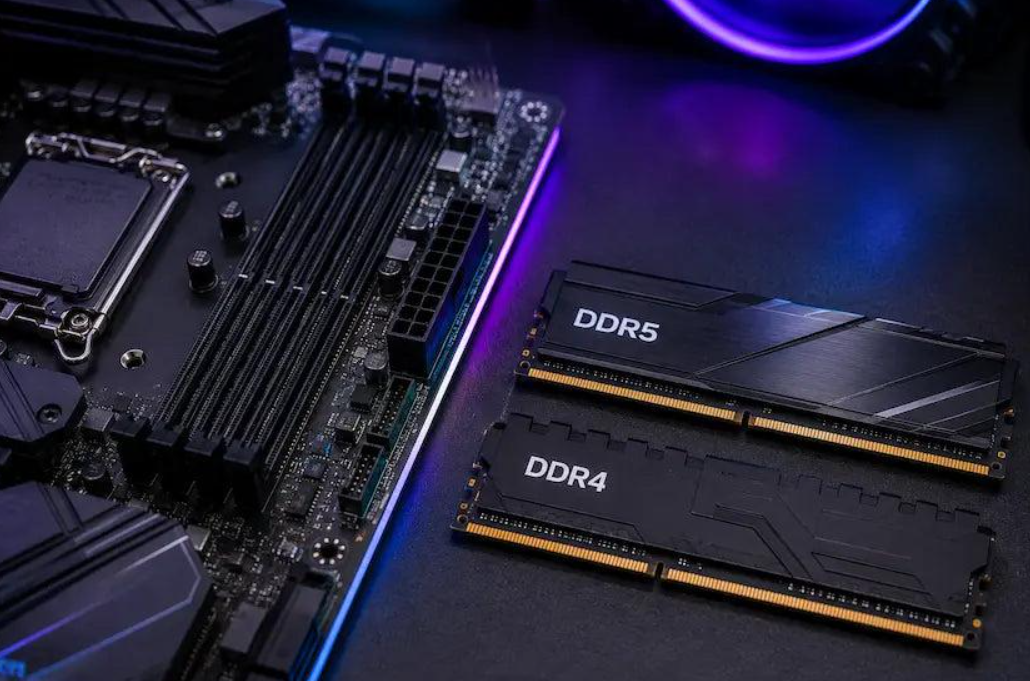
Before purchasing memory, confirm which generation your motherboard and processor support. DDR4 and DDR5 are physically and electrically different and cannot be used interchangeably in the same memory slot.
Also consider the supported memory speeds of your processor and motherboard. Buying a memory kit with a higher advertised speed does not guarantee that it will operate at that speed automatically.
On compatible systems, enabling a supported memory profile such as XMP or AMD EXPO may allow the RAM to run at its advertised settings. These options are not available on every system and should be configured according to the motherboard manufacturer’s instructions.
For most users, choosing sufficient capacity and ensuring compatibility should come before chasing small differences in memory speed.
Should You Use One RAM Stick or Two?
Many desktop gaming systems can benefit from running two compatible memory modules in dual-channel mode.
Dual-channel memory can increase available memory bandwidth compared with a single-channel configuration, potentially improving performance in some games and applications.
For example, a compatible 16GB kit containing two 8GB modules may offer a different memory configuration from a single 16GB module.
However, the exact performance impact depends on the platform, game, processor, and other hardware.
When installing two modules, consult the motherboard manual to identify the recommended slots. On many motherboards, the preferred arrangement is not simply placing the modules next to each other.
Do not mix memory modules without checking compatibility. Different capacities, speeds, timings, and memory configurations can affect stability or cause the system to run at a lower supported speed.
If you are upgrading an existing PC, check the motherboard’s specifications and the configuration of your current RAM before buying anything.
How to Check How Much RAM Your PC Has
If you are unsure whether your computer has 8GB, 16GB, or 32GB of RAM, Windows makes it easy to check.
Method 1: Use Windows Settings
- Open the Start menu.
- Select Settings.
- Open System and then About.
- Find the Installed RAM information.
This shows the amount of installed memory recognized by Windows.
Method 2: Use Task Manager
- Press
Ctrl + Shift + Esc. - Open the Performance section.
- Select Memory.
- Check the total capacity, current usage, and available memory.
Task Manager can also help you identify whether memory usage remains high while your game is running.
For a more useful test, launch the game you normally play, load a typical gameplay session, and check memory usage again. Remember that a high percentage of memory usage alone does not prove that you need an upgrade. Windows uses available memory for caching, and the more important question is whether the system experiences memory pressure or performance problems.
How to Know Whether You Need More RAM
Before purchasing new memory, look for evidence that your current capacity is limiting your system.
Possible warning signs include:
- Memory usage consistently approaches capacity during gameplay.
- The game stutters when several applications are open.
- Switching between a game and other programs becomes slow.
- Windows reports insufficient memory.
- Your system becomes noticeably less responsive during demanding workloads.
These symptoms can also have other causes, including storage problems, software bugs, or CPU limitations. Monitoring memory usage alongside CPU, GPU, and disk activity can help you narrow down the problem.
If you regularly run out of memory, adding RAM may be a sensible upgrade. If memory usage remains comfortable, investigate other potential bottlenecks before spending money.
How Much RAM Do You Need for Gaming and Streaming?
Streaming and recording gameplay introduce additional workloads.
The amount of RAM required depends on the game, streaming software, recording settings, browser sources, overlays, and any other programs running at the same time.
Sixteen gigabytes can work for some gaming and streaming setups, but 32GB provides more room for demanding games and multitasking.
For a new PC intended for gaming, streaming, and everyday productivity, 32GB is a reasonable capacity to consider when it fits the budget.
However, RAM is only one part of a streaming setup. The CPU, GPU, video encoder, storage, and internet upload connection also affect the overall experience.
If your streams suffer from dropped frames or encoding problems, do not assume that a memory upgrade alone will solve them.
What About Gaming Laptops?
Gaming laptops follow the same basic memory principles as desktop PCs, but upgrading them can be more complicated.
Some laptops allow users to replace or expand their RAM, while others have memory soldered directly onto the motherboard.
Before buying memory for a laptop, check the manufacturer’s specifications for:
- Maximum supported memory capacity.
- DDR generation and memory type.
- Supported speeds.
- Number of memory slots.
- Whether the existing RAM can be replaced.
- Any configuration restrictions.
If your laptop already has sufficient memory, an upgrade may not improve gaming performance. A laptop that is overheating or using a limited-power graphics configuration may need a different solution.
Always confirm upgrade compatibility before purchasing components.
Frequently Asked Questions About Gaming RAM
Is 16GB or 32GB better for gaming?
Both can be appropriate. Sixteen gigabytes is enough for many gaming setups, while 32GB offers more headroom for demanding games, multitasking, and streaming. The better choice depends on your games, budget, and workload.
Does 32GB RAM increase FPS compared with 16GB?
Not necessarily. If 16GB is already sufficient, moving to 32GB may produce little difference in average FPS. If your system is running out of memory, the upgrade may improve performance consistency and reduce memory-related slowdowns.
Is 8GB RAM enough for Minecraft?
It depends on the version, settings, modifications, and other applications running. Some Minecraft setups can run with 8GB of total system memory, but heavily modified installations may need substantially more. Remember that the game is not the only program using your computer’s RAM.
Is DDR5 better than DDR4 for gaming?
DDR5 offers newer memory technology and can provide higher bandwidth, but the real-world benefit varies by game and hardware platform. You cannot simply replace DDR4 with DDR5 on a motherboard that supports only DDR4. Consider the total cost of a compatible upgrade rather than comparing memory generations in isolation.
Can I mix 8GB and 16GB RAM sticks?
Some systems can operate with different module capacities, but compatibility and performance depend on the motherboard, processor, and modules. The resulting configuration may operate in a mixed-channel mode or at a lower supported speed. Check your system’s documentation before combining modules.
How much RAM will gaming PCs need in the future?
Requirements will continue to vary by game and workload. More demanding software may benefit from additional memory, but it is impossible to predict one capacity that will be ideal for every future title. Choose memory based on current requirements, your intended use, and your upgrade budget.
Final Verdict: What Is the Best RAM Capacity for Gaming?
For many gaming PCs in 2026, 16GB remains a practical starting point, while 32GB is a comfortable option for players who want more memory headroom for modern games and multitasking.
Eight gigabytes can still serve lightweight or older games, but it is restrictive for a general-purpose modern gaming PC. Sixty-four gigabytes is better suited to users who combine gaming with demanding creative, technical, or professional workloads.
The most important rule is to avoid buying RAM based on capacity alone. Check the games you play, monitor memory usage, confirm motherboard compatibility, and identify whether memory is actually limiting performance.
When you choose the right capacity for your needs, you can spend your upgrade budget more effectively and build a gaming PC that delivers a smoother experience without unnecessary expenses.