FPS vs. Hz vs. Response Time: What’s the Difference?
When shopping for a gaming monitor or trying to improve your gaming performance, you will often encounter three specifications: FPS, refresh rate (Hz), and response time (ms).
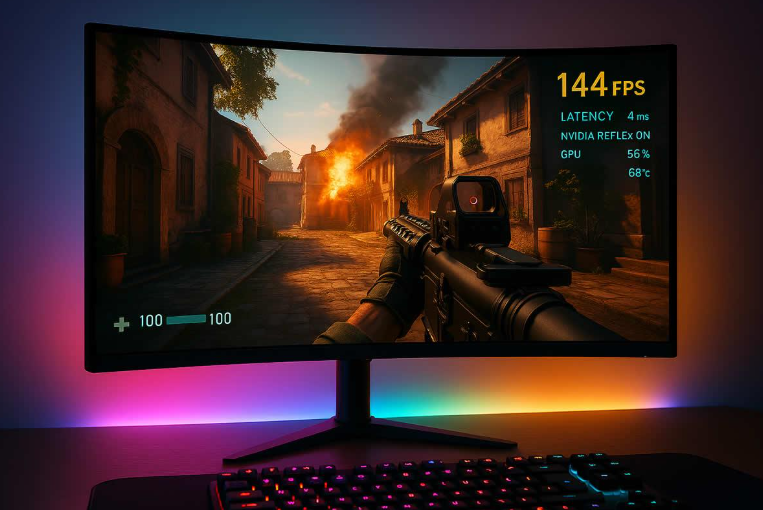
These terms are related, but they do not measure the same thing. FPS tells you how many frames your computer or console renders each second. Refresh rate describes how many times your monitor can refresh its image each second. Response time measures how quickly a pixel can change from one state to another under a specified test.
Understanding the difference between FPS, Hz, and response time can help you choose the right gaming monitor, configure your games correctly, and understand why a game may feel smooth on one setup but less responsive on another.
In this guide, we will explain each specification, show how they work together, and answer common questions about 60Hz, 144Hz, 240Hz, and other gaming display technologies.
What Is FPS in Gaming?
FPS stands for frames per second. It measures how many individual frames a computer or console renders during one second of gameplay.
A frame is a single image in the sequence that creates the appearance of movement. When a game renders more frames each second, it can provide more frequent visual updates and potentially smoother motion.
For example:
- 30 FPS: The game renders 30 frames per second.
- 60 FPS: The game renders 60 frames per second.
- 120 FPS: The game renders 120 frames per second.
- 240 FPS: The game renders 240 frames per second.
Higher FPS can make movement look smoother and may reduce the time between rendered frames. This can be particularly noticeable in fast-paced games, such as competitive shooters and racing titles.
However, FPS is not determined by the monitor alone. It depends on factors such as the graphics card, processor, game engine, resolution, graphics settings, and optimization.
A powerful gaming PC may render hundreds of frames per second in a lightweight game but struggle to maintain 60 FPS in a demanding title with intensive graphics.
Does Higher FPS Always Mean Better Gaming Performance?
Not necessarily.
Higher FPS can improve motion smoothness and responsiveness, but the benefits depend on your hardware, monitor, game, and preferences.
Stable frame delivery is also important. A game that fluctuates dramatically between high and low frame rates may feel less consistent than one that maintains a lower but steadier frame rate.
If your PC struggles to maintain its target FPS, lowering demanding graphics settings may provide a more consistent experience than simply trying to maximize the highest number displayed by an FPS counter.
What Does Hz Mean on a Gaming Monitor?
Hz stands for hertz. On a monitor, the refresh rate describes how many times the display can refresh its image each second.
A 60Hz monitor can refresh up to 60 times per second, while a 144Hz monitor can refresh up to 144 times per second.
Common gaming monitor refresh rates include:
| Refresh rate | Maximum refreshes per second | Typical appeal |
|---|---|---|
| 60Hz | 60 | Everyday use and many standard gaming setups |
| 120Hz | 120 | Smooth gameplay on compatible displays and consoles |
| 144Hz | 144 | Popular for PC gaming |
| 165Hz | 165 | A common higher-refresh-rate PC option |
| 240Hz | 240 | Competitive gaming and high-frame-rate systems |
| 360Hz | 360 | Specialized high-refresh-rate competitive setups |
A higher refresh rate allows the monitor to display updates more frequently. This can make motion appear smoother and help players see updated visual information sooner.
However, a 240Hz monitor does not automatically make every game run at 240 FPS. The computer or console must render frames, and the game must support the required performance.
A display can have a high refresh rate while the game itself runs at a much lower frame rate.
Is a 144Hz Monitor Better Than a 60Hz Monitor?
A 144Hz monitor can provide noticeably smoother motion than a 60Hz monitor when the system delivers sufficiently high and consistent frame rates.
The difference can be especially noticeable when moving the camera quickly, tracking opponents, or navigating fast-moving environments.
A 60Hz display can still provide a good gaming experience, especially for slower-paced games, casual play, and systems that cannot consistently produce higher frame rates.
The best choice depends on your budget, hardware, preferred games, and whether you value high refresh rates enough to justify the cost.
What Is Response Time on a Monitor?
Response time describes how quickly a display pixel changes from one state to another.
Manufacturers commonly advertise response time in milliseconds (ms). Gaming monitor specifications often use gray-to-gray (GtG) measurements, which describe a transition between shades of gray.
A monitor advertised with a 1ms response time is claiming a very fast pixel transition under its specified test conditions. However, the exact result depends on the measurement method, display settings, and pixel transition being measured.
Response time matters because slow pixel transitions can create visible trails behind moving objects. This effect is commonly called ghosting.
Some monitors also use aggressive overdrive settings to accelerate pixel transitions. If these settings are too strong, they can introduce inverse ghosting, which appears as bright or dark trails around moving objects.
For that reason, the lowest advertised response time is not automatically the best real-world result.
When comparing monitors, look for independent reviews that examine motion clarity, response-time consistency, and overshoot rather than relying on the specification printed on the box.
FPS vs. Hz vs. Response Time: The Main Differences
Although these three specifications influence the gaming experience, each describes a different part of the process.
| Specification | What it measures | Why it matters |
|---|---|---|
| FPS | Frames rendered by the game each second | Influences motion smoothness and frame delivery |
| Refresh rate (Hz) | Monitor refreshes each second | Determines how frequently the display can update |
| Response time (ms) | How quickly pixels transition between states | Affects pixel-transition blur and ghosting |
Think of gaming as a chain of related processes.
The computer renders frames. The monitor refreshes its image to display available frames. The pixels then transition to represent the new image.
A bottleneck or limitation at one stage can affect the overall experience, even if the other specifications look impressive.
For example, a high-FPS gaming PC connected to a 60Hz monitor cannot display every rendered frame as a separate complete refresh. Meanwhile, a 240Hz monitor may offer limited benefits if the system consistently produces only a small number of frames per second.
A display with fast pixel transitions can also look clearer in motion than a display with slower transitions, even when both have the same refresh rate.
What Happens If Your FPS Is Higher Than Your Monitor’s Hz?
Suppose your computer renders a game at 200 FPS while your monitor operates at 144Hz.
The monitor can refresh up to 144 times per second, but the game is producing frames at a higher rate.
Without synchronization, the display may show portions of different frames in a single refresh. This visual artifact is called screen tearing.
Rendering more frames than the monitor’s refresh rate can still affect responsiveness because the system may have newer frames available more frequently. However, the benefit depends on the game’s rendering pipeline, input latency, and synchronization settings.
You do not need to force your FPS to equal your refresh rate in every situation. Different configurations offer different trade-offs between responsiveness, smoothness, tearing, and system load.
Should You Limit Your FPS to Match Your Monitor?
Sometimes, but not always.
An FPS limit can help stabilize frame delivery, reduce unnecessary GPU workload, or make performance more consistent. In other situations, allowing higher FPS may reduce input latency.
The best setting depends on your game, hardware, synchronization technology, and priorities.
If you use variable refresh rate technology, such as a compatible G-SYNC or FreeSync setup, follow the recommended configuration for your monitor and game. Some setups benefit from an FPS cap slightly below the maximum refresh rate, but the ideal setting is not universal.
Test the results instead of assuming that one configuration is best for every system.
What Happens If Your FPS Is Lower Than Your Monitor’s Hz?
A high-refresh-rate monitor can still be useful when your game does not consistently reach its maximum refresh rate.
For example, a game running at 90 FPS on a 144Hz monitor may still look smoother than it would on a 60Hz display, depending on frame delivery, synchronization, and other factors.
However, the monitor cannot create extra rendered frames that the game has not produced.
If your game runs at 45 FPS, switching to a 240Hz monitor will not automatically make it run at 240 FPS.
To improve performance, investigate your CPU, GPU, graphics settings, temperatures, memory usage, and game-specific limitations.
A high-refresh-rate display is most useful when paired with hardware capable of delivering frame rates that take advantage of its capabilities.
Which Matters More for Gaming: FPS, Hz, or Response Time?
There is no single winner because these specifications serve different purposes.
For Competitive FPS Games
For competitive shooters, a combination of high and consistent FPS, a high refresh rate, and good pixel response can provide a more responsive experience.
Players who prioritize competitive performance often prefer 144Hz, 240Hz, or higher-refresh-rate monitors, provided their systems can deliver appropriate frame rates.
However, aiming skill, game knowledge, stable network performance, and practice remain important. A high-refresh-rate monitor cannot replace those factors.
For Story-Driven and Single-Player Games
For cinematic adventures, role-playing games, and slower-paced titles, image quality, resolution, contrast, and consistent performance may matter as much as or more than extremely high refresh rates.
A good 60Hz or 120Hz display can provide an enjoyable experience, depending on the game and the player’s preferences.
For Racing and Sports Games
Racing games and sports titles often benefit from smooth motion, especially when the camera moves quickly across the environment.
A higher refresh rate can improve the viewing experience when the game supports higher frame rates, while good pixel response helps reduce distracting trails during fast movement.
Ultimately, the ideal display depends on the kind of games you play and the balance you want between performance and image quality.
Does Response Time Affect Input Lag?
Response time and input lag are related to the overall display experience, but they are not the same thing.
Response time describes pixel transitions. Input lag describes the delay between an input or generated frame and the corresponding image appearing on the display.
System latency can involve several stages, including controller or mouse input, game processing, rendering, synchronization, and display processing.
A monitor with fast pixel response may reduce visible ghosting, but that specification alone does not prove that the display has low input lag.
When choosing a gaming monitor, look for independent measurements of both response behavior and input lag if competitive responsiveness is important to you.
How to Choose the Right Gaming Monitor
Before buying a monitor, consider your hardware, preferred games, budget, and the specifications that will make the biggest difference to your experience.
1. Check your PC or console’s performance. Consider the frame rates your system can realistically achieve in the games you play.
2. Choose an appropriate refresh rate. A 144Hz monitor is a useful target for many PC gaming setups, while 240Hz or higher may appeal to competitive players with powerful hardware.
3. Look beyond the advertised response time. Independent testing can reveal ghosting, overshoot, and motion clarity that a single millisecond figure cannot fully describe.
4. Consider resolution and image quality. Higher resolutions can improve detail but require more graphics processing power at the same settings.
5. Check variable refresh rate support. Compatible adaptive-sync technologies can help reduce tearing and stuttering within their supported operating ranges.
6. Consider your budget as a whole. Spending more on a monitor may not be worthwhile if your system cannot make good use of its features. Conversely, a capable gaming PC may benefit from a display upgrade if the existing monitor is a significant limitation.
A balanced setup generally delivers better value than choosing a monitor based on one impressive specification.
Frequently Asked Questions
Is 144Hz the same as 144 FPS?
No. A 144Hz monitor can refresh its display up to 144 times per second, while 144 FPS means the game is rendering 144 frames per second. They are different measurements, although they can work together to provide smooth gameplay.
Is 1ms response time good for gaming?
A genuine, well-measured 1ms pixel transition can be excellent for gaming. However, advertised figures depend on the testing method and may not represent every pixel transition. Independent reviews provide a better indication of real-world motion clarity.
Can the human eye see more than 60 FPS?
Human vision does not have a simple universal FPS limit. People can perceive differences in motion smoothness and responsiveness above 60 FPS, although the experience varies with the task, display, and individual.
Does a 240Hz monitor make you better at gaming?
A 240Hz monitor can provide smoother motion and may reduce display-related delay when paired with suitable hardware. However, it does not automatically improve aim, decision-making, or overall skill.
Is 60Hz enough for gaming?
Yes. A 60Hz monitor can provide an enjoyable experience for many games, especially story-driven adventures, strategy games, and casual play. Higher refresh rates are useful for players who value smoother motion and have hardware capable of taking advantage of them.
What is more important: FPS or refresh rate?
Neither specification works in isolation. FPS describes how frequently the game renders frames, while refresh rate describes how frequently the monitor updates. A good balance between the two helps deliver smooth and responsive gameplay.
Final Verdict: Understanding FPS, Hz, and Response Time
FPS, refresh rate, and response time are three different specifications that work together to shape your gaming experience.
FPS measures how many frames the game renders each second. Refresh rate tells you how often the monitor can update its image. Response time describes how quickly pixels transition between states.
For many PC gamers, a high and consistent frame rate combined with a 144Hz or faster monitor and good pixel response can provide an excellent experience. However, the best setup depends on your hardware, budget, and preferred games.
Before buying a new display, consider all three specifications alongside resolution, image quality, input lag, and variable refresh rate support.
Understanding these differences will help you make a more informed decision and avoid spending money on features that do not address your actual gaming needs.