

GearUP Booster Review: Can It Really Reduce Gaming Ping?
Affiliate disclosure: PlayOnReviews may earn a commission if you purchase through links in this article, at no additional cost to you.
High ping, sudden lag spikes, and unstable connections can make online gaming frustrating. Whether you’re competing in a tactical shooter or playing with friends in an online multiplayer world, network problems can affect your experience.
GearUP Booster is a gaming network optimization tool designed to help players improve connection stability and potentially reduce ping. But how does it work, and is it worth trying?
In this guide, we’ll explore GearUP Booster’s main features, its potential benefits and limitations, its partnerships across the gaming industry, and what to consider before subscribing.
What Is GearUP Booster?
GearUP Booster is a gaming network optimization service designed to help players establish more efficient network routes when connecting to online game servers.
In some situations, the route between your device and a game server may introduce unnecessary latency or instability. Network optimization tools attempt to improve that connection path when possible.
GearUP offers subscription plans and supports a range of games and devices. Its official website provides information about supported platforms, features, and available plans.
Results depend on your internet provider, location, selected game server, network conditions, and the route your connection normally takes. No improvement is guaranteed for every player.
Try GearUP Booster →How Does GearUP Booster Work?
Online games exchange data between your device and remote servers. The time this data takes to travel back and forth is commonly measured as ping, in milliseconds (ms).
GearUP Booster aims to optimize the network route used for supported games. Depending on your connection, this may help reduce latency or improve connection consistency.
Network Route Optimization
The service is designed to help route game traffic through network paths that may provide a better connection to a supported game server.
Potential Ping Improvements
If your normal route is inefficient, an alternative route may reduce the time it takes for game data to travel. However, lower ping is not guaranteed, and some connections may show little or no improvement.
Connection Stability
Network instability can contribute to inconsistent gameplay. GearUP aims to improve connection stability in supported scenarios, although it cannot eliminate every cause of lag, packet loss, or disconnections.
What Are the Potential Benefits?
Potential Advantages
- May improve network routing for supported games.
- Could reduce ping in certain network conditions.
- Designed for players experiencing connection problems.
- Offers subscription options for different durations.
- Supports multiple gaming platforms, depending on the product.
Things to Consider
- Results vary depending on your network.
- A subscription may be required for continued use.
- It cannot fix every internet or server problem.
- Supported games and features can vary by platform.
- Some players may see little difference.
Can GearUP Booster Help in Competitive Games?
In competitive games, a stable connection can make online matches feel more consistent. GearUP may be worth testing if you regularly experience high ping while your internet connection otherwise appears to be working properly.
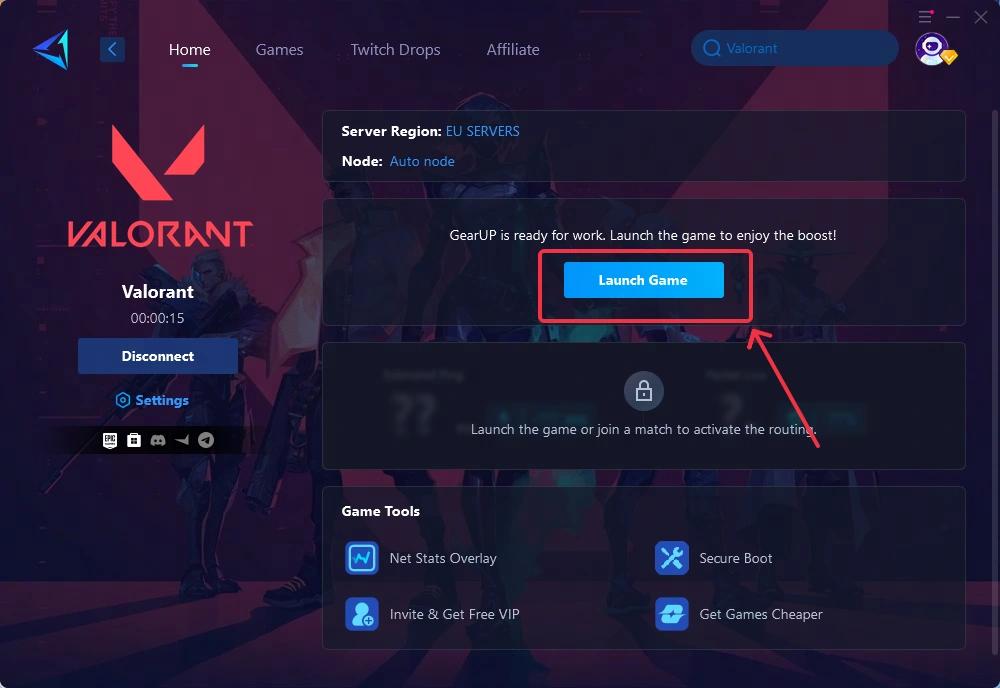
GearUP’s software includes a game-selection interface and connection-boosting features. The image above shows VALORANT selected, but individual features and compatibility should always be checked against the current version of the software.
Keep in mind that ping also depends on the distance to the game server, your internet provider, Wi-Fi quality, network congestion, and the game’s own server performance. A network booster cannot remove the physical distance between you and a server.
Does GearUP Booster Support Every Game?
No network optimization service should be assumed to support every game or every platform. Availability and features can vary by title, device, operating system, and subscription.
Before subscribing, check GearUP’s official website to confirm whether your preferred game and gaming platform are supported.
GearUP’s website lists a variety of games across PC and other platforms. Its catalog can change as new titles and updates are added.
Explore GearUP Booster →GearUP Booster’s Partnerships and Collaborations
Beyond its network optimization software, GearUP has developed collaborations across gaming, esports, technology, and online communities. These relationships help illustrate the company’s presence in the wider gaming ecosystem.

The collaboration showcase includes a range of names and organizations, such as:
- TSM: an esports organization with a presence in competitive gaming.
- ASUS: a technology and hardware brand.
- Microsoft: a technology company whose products and platforms are widely used by gamers.
- Delta Force: a tactical shooter franchise.
- NARAKA: BLADEPOINT: an action game with competitive multiplayer elements.
- Strinova: a multiplayer shooter.
- Blood Strike and Farlight 84: games in the online shooter category.
The graphic also identifies other collaborators and media or community relationships. The type of relationship differs by organization, so the presence of a name should not automatically be interpreted as an endorsement of every GearUP product or a guarantee of improved performance.
GearUP’s official website also highlights collaborations involving PUBG, Where Winds Meet, ASUS, Discord, and Escape from Tarkov. You can check its current partner announcements for more information about the scope of individual collaborations.
Is GearUP Booster Worth Trying?
GearUP Booster may be useful for gamers whose connection problems are related to inefficient network routing. However, it is not a universal solution for every type of lag.
If your main problem is a weak Wi-Fi signal, background downloads, an overloaded home network, or poor game server performance, addressing the underlying issue may be more effective than purchasing an additional service.
Before committing to a subscription, review the current plans, supported games, and any available trial or refund conditions directly with GearUP.
How to Evaluate Your Results
If you decide to test GearUP Booster, compare your connection under similar conditions before and after using it.
- Choose the same game and server region.
- Record your usual ping and note any connection instability.
- Test GearUP under similar network conditions.
- Compare the results across several sessions rather than relying on one match.
- Decide whether any improvement justifies the subscription cost.
For a fair comparison, avoid changing several network settings at the same time. This makes it easier to identify whether the tool is actually helping.
Final Verdict
GearUP Booster is a gaming network optimization tool worth considering if you experience high ping or inconsistent connections in supported online games.
Its potential value depends on your individual network conditions. Some players may benefit from improved routing, while others may notice little difference. Checking compatibility and testing performance before committing to a subscription are sensible steps.
Its collaborations across gaming, esports, and technology also demonstrate its involvement in the gaming ecosystem, although individual partnership announcements should be evaluated on their own terms.
For more gaming news, reviews, and practical guides, keep following PlayOnReviews.
Try GearUP Booster →Affiliate disclosure: PlayOnReviews participates in affiliate marketing. We may receive a commission from qualifying purchases made through links on this page. This does not increase the price you pay.